For family doctors
The consultation no longer waits for PIAS
MedicCloud is software for Romanian family practices that runs in the browser. You sign a consultation with F10, and at month-end the checklist and the figures are on one screen.
Sign with F10
without waiting for PIAS to answer
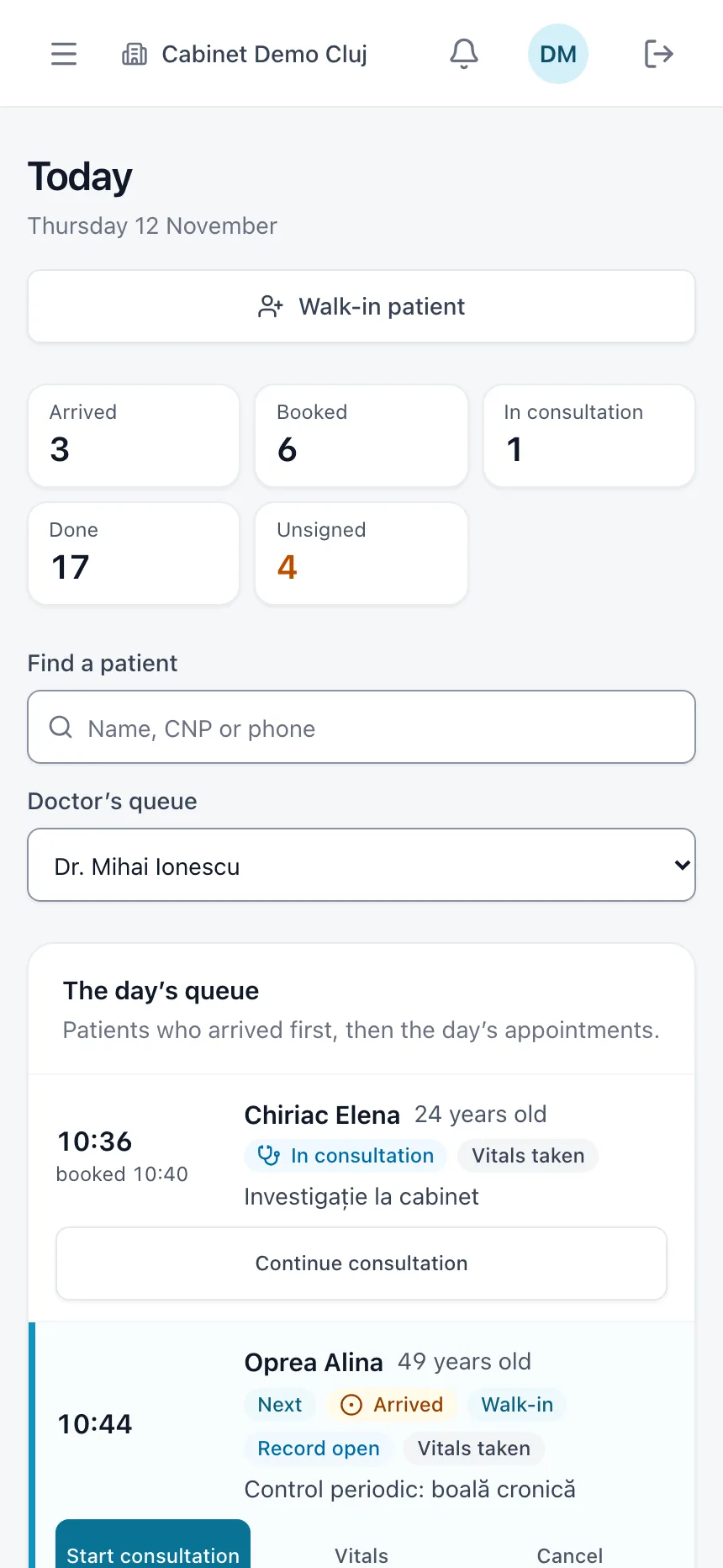
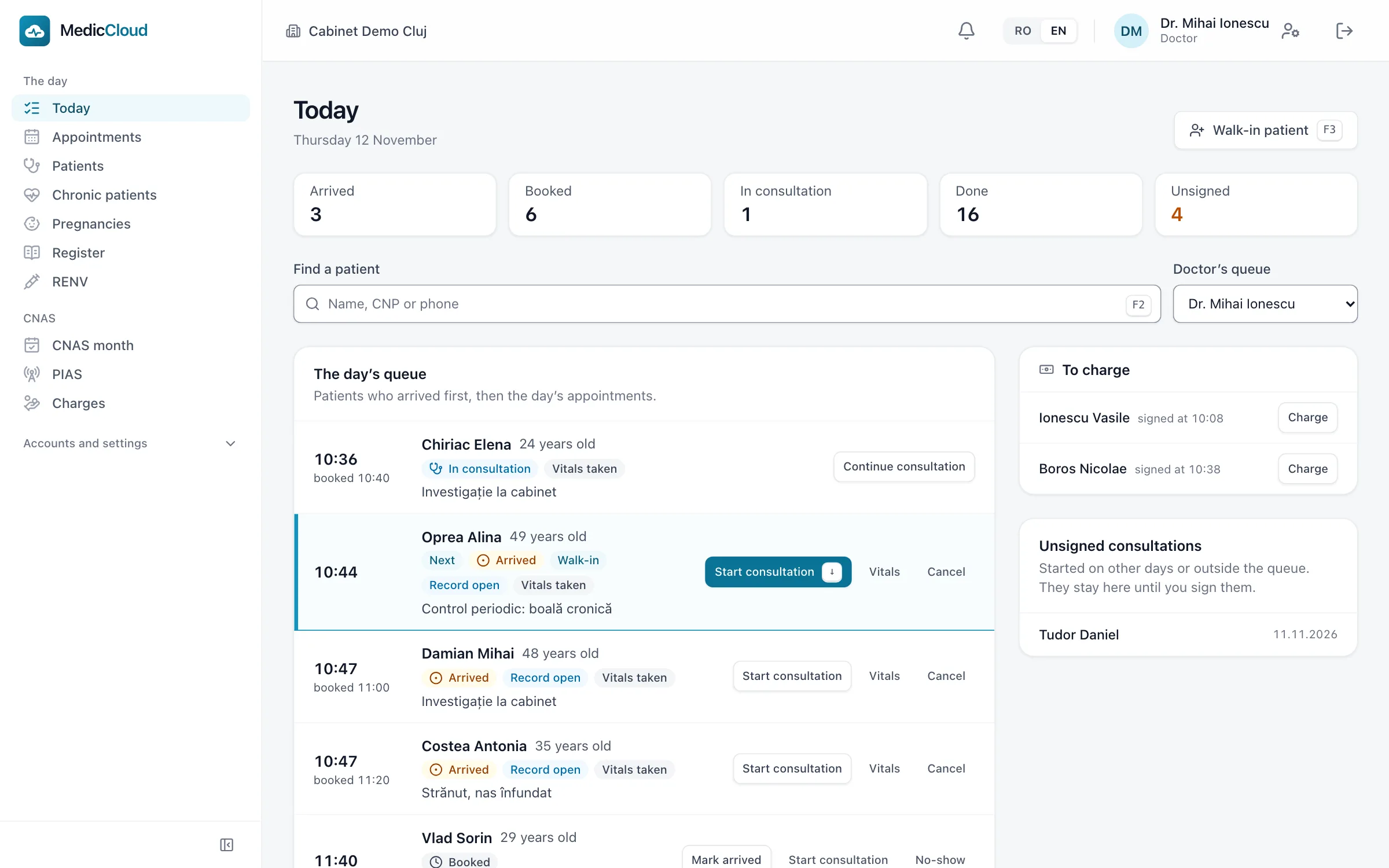
The day’s queue
arrived patients and appointments
Month-end
the checklist and the figures
In the browser
no server in the practice
Three screens from MedicCloud
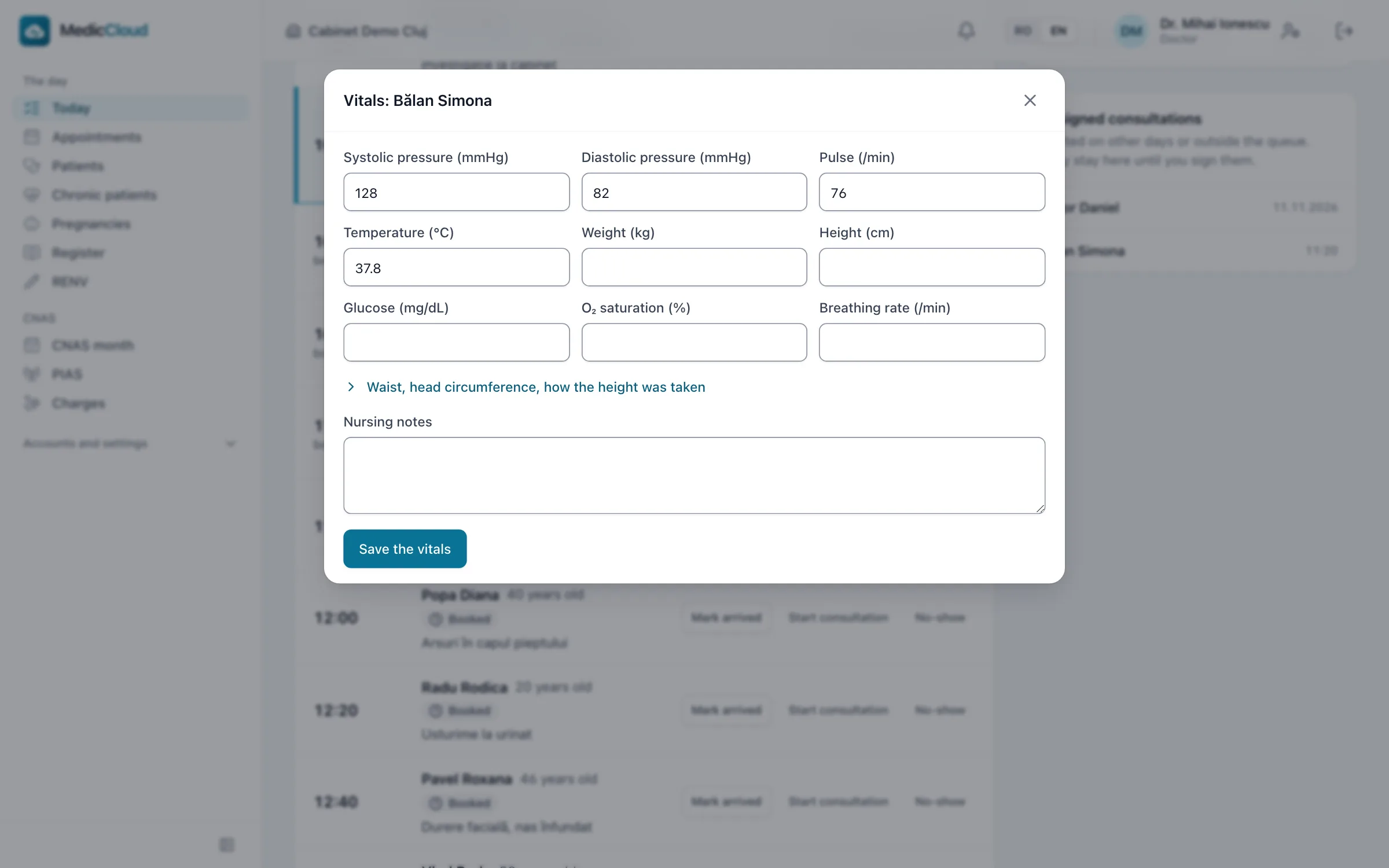
The patient arrives, the nurse takes the vitals and the doctor starts the consultation.
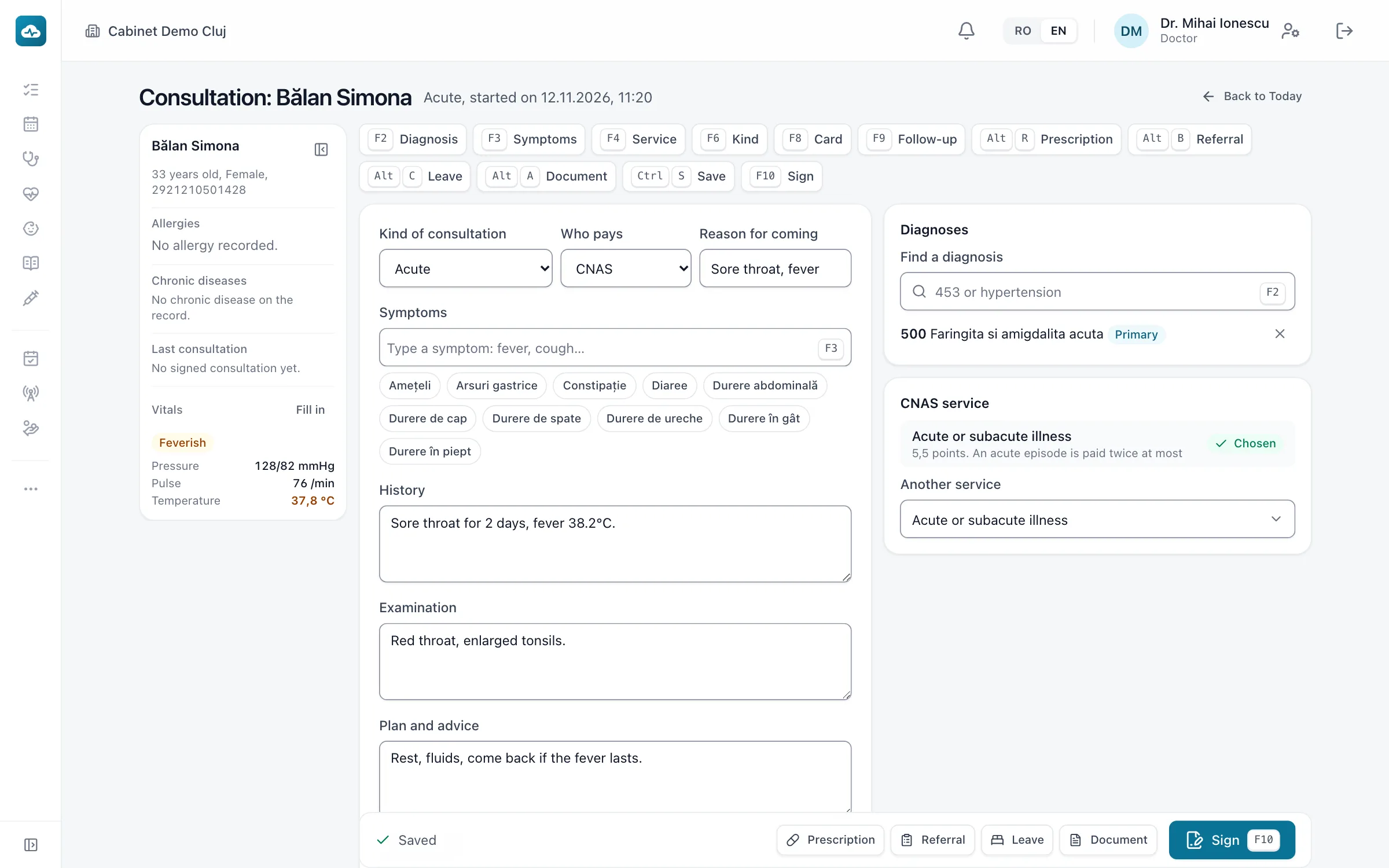
The doctor writes the note, chooses the diagnosis with F2 and the suggested service with F4, then signs with F10.
The month’s list and its figures by age band and by service, before the month is closed.
Filmed in MedicCloud, with test data.
A patient’s visit, from booking to signature
There are five steps. What is recorded at one step is there at the next.
01
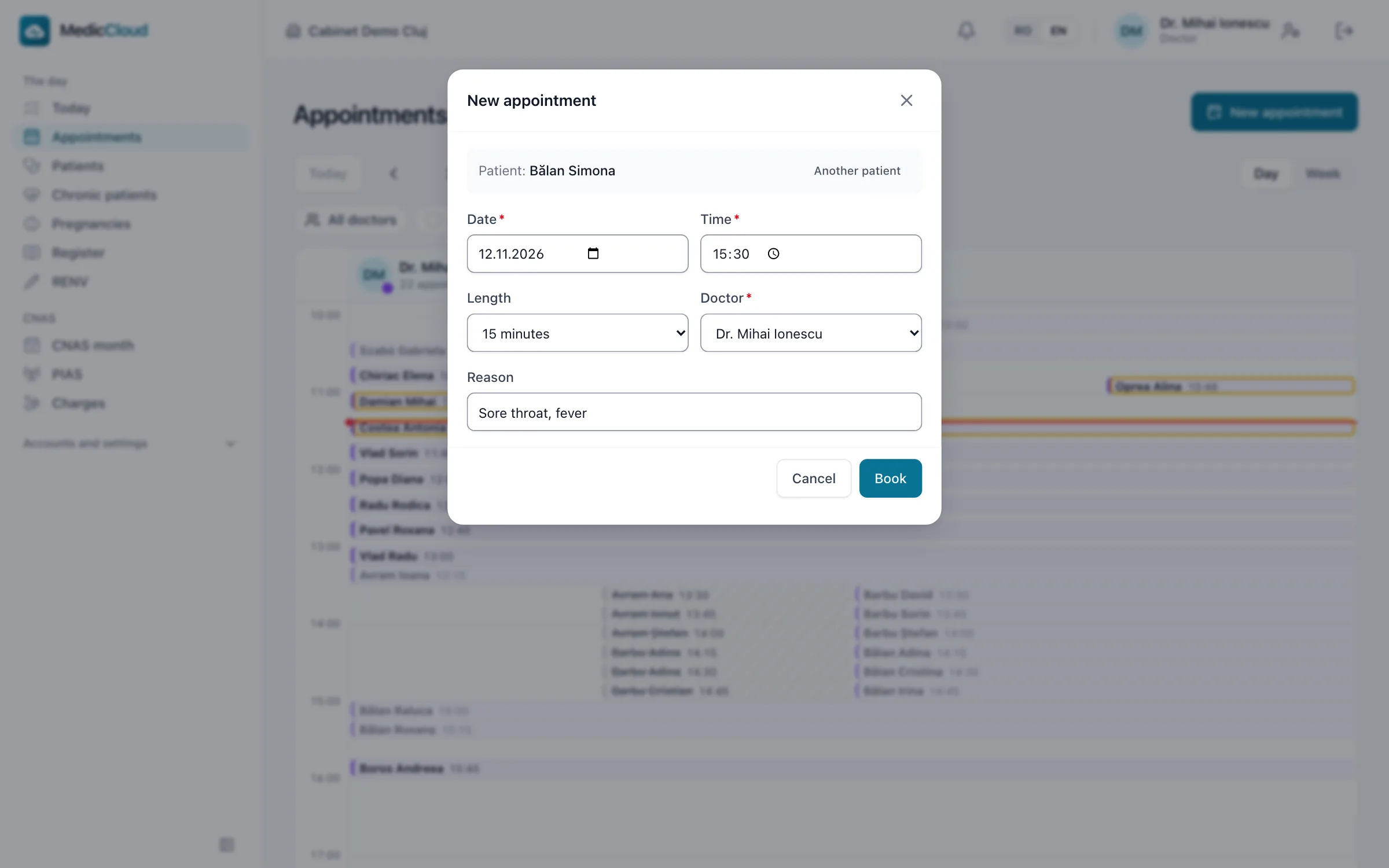
The booking
Book the patient in the calendar for a doctor and a time. The calendar does not accept two bookings at the same time for the same doctor.
02
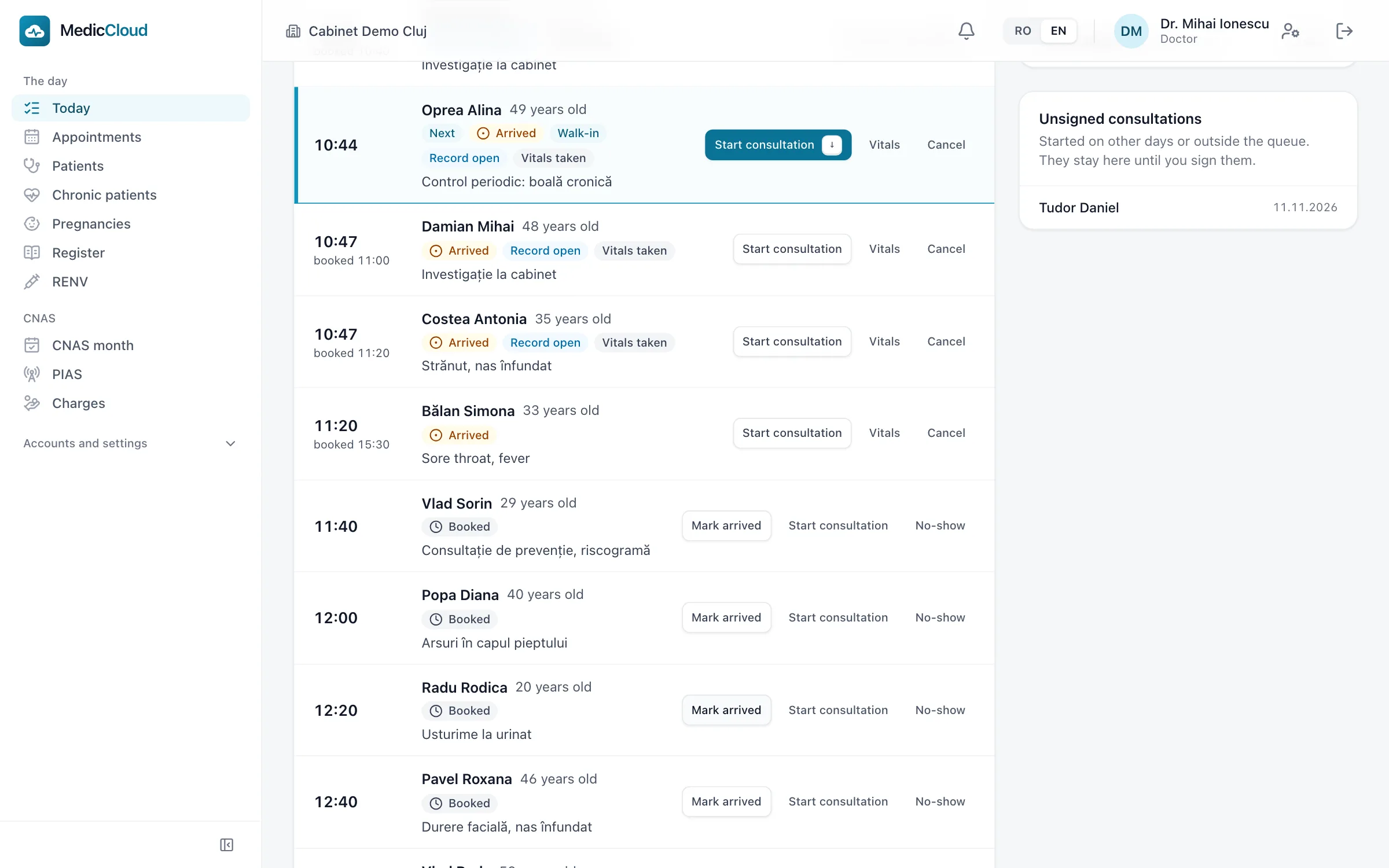
Arrived
The nurse marks the patient as arrived, and the patient joins the day’s queue. The queue shows arrived patients first, then the bookings still to come.
03
Vitals
The nurse records blood pressure, pulse and weight, and the doctor finds them in the consultation.
04
The consultation
The doctor has the allergies, chronic conditions, check-ups and vaccines due and the last visit in view. The CNAS service is suggested from the record.
05
Signed
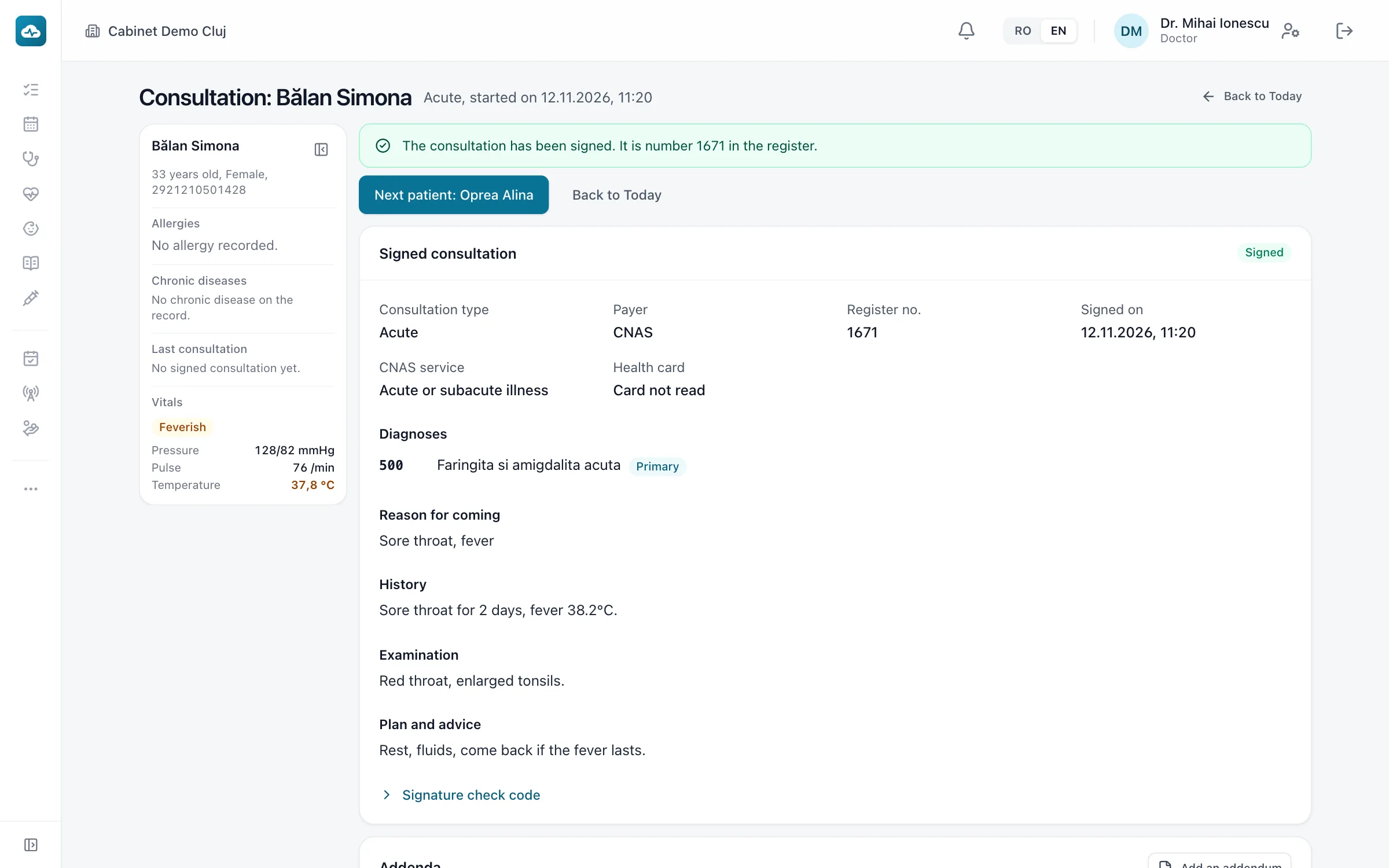
The doctor signs with F10 and moves on to the next patient. What PIAS must validate joins the queue.
Working from the keyboard
You can try it here. F2 chooses the diagnosis, F4 chooses the suggested service and F10 signs. On a phone, tap the keys below.
Ana Popescu, 58
A demonstration with made-up data.
Consultation note
History
Back for her blood pressure check. No new complaints. BP 135/85 mmHg.
Diagnoses
No diagnosis chosen.
I10 Essential (primary) hypertensionPrimary
CNAS service
Periodic consultation, chronic conditions
SuggestedChosenClick the consultation, then use the keys.
When PIAS is not responding, the practice keeps working
Signing a consultation does not depend on an answer from PIAS. What PIAS must validate waits in a queue, where you can see the legal deadline of 3 working days.
PIAS status in the demonstration
0consultations signed
The PIAS queue
A demonstration with made-up data.
- The queue is empty. Sign a consultation.
Signing works the same when PIAS isn’t answering.
Month-end, on one screen
The month’s list shows what is still to be solved and takes you to where it is solved, and the figures are worked out as you go. You can try it here by solving each line.
CNAS month
A demonstration with made-up data.
- List
- Figures
- Close
The month’s list
What to look at before you close.
- Stops the close
The consultation of 28.10 is unsigned. Until you sign it, it earns nothing and isn’t reported.
- Have a look
Some people fit no age band and aren’t counted. Check their birth dates.
- Have a look
Some people earn the 5% bonus. Keep their proof in the file.
Nothing to solve. All is well.
The month is ready to close
The demonstration stops here. In the practice, a closed month keeps its figures.
People on the list
By age band and sex
| By age band and sex | Women, Men |
|---|---|
| 0-3 | |
| 4-59 | |
| 60+ |
What else is in MedicCloud
The patient’s history, in a timeline
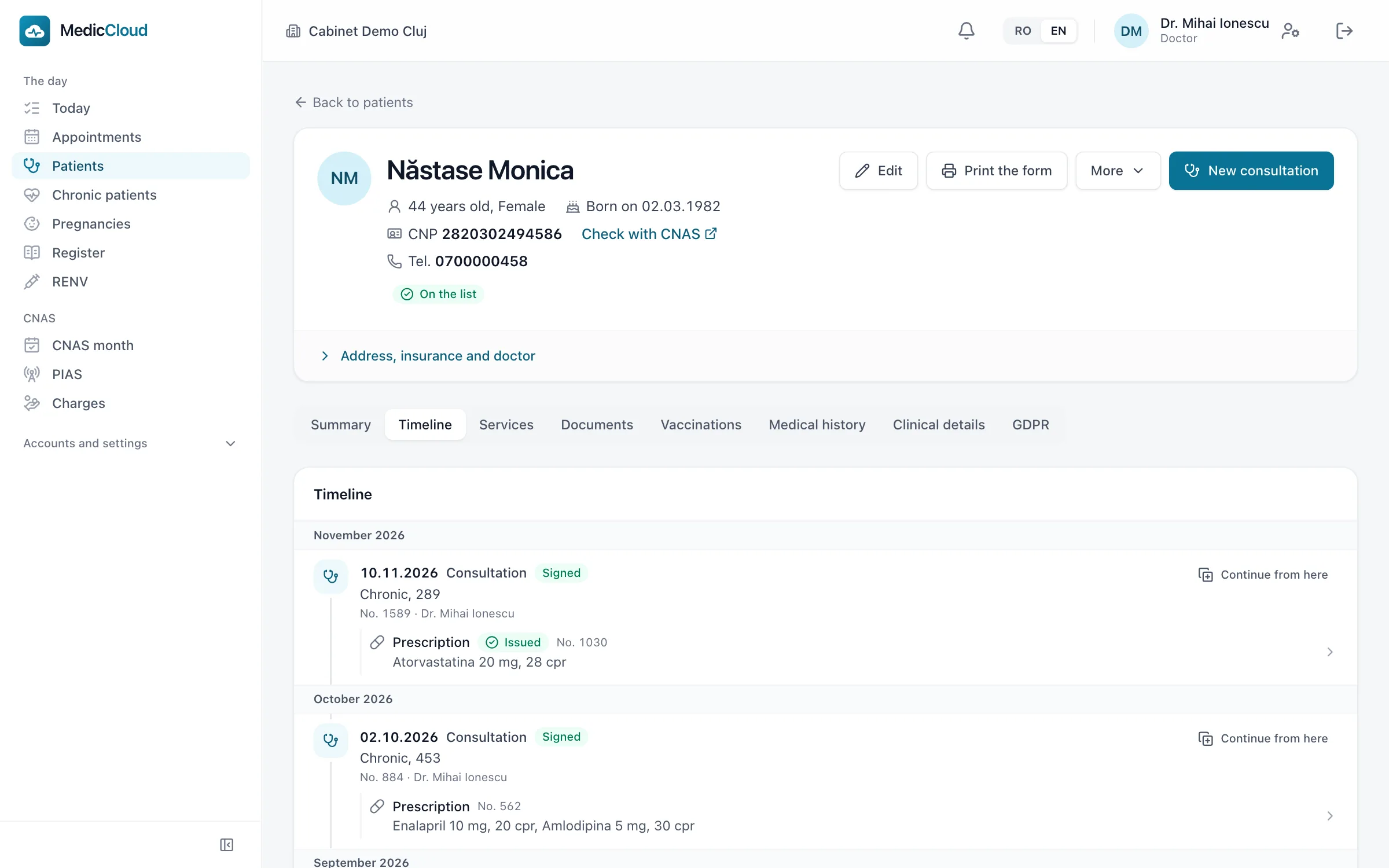
A patient’s consultations, prescriptions, referrals and documents appear in order, month by month. From any visit, “Continue from here” opens a new consultation that starts from it.
Consultation and documents
- History and SCORE2 risk
- Family history, lifestyle and the SCORE2 cardiovascular risk are kept on the patient’s record.
- Chronic prescriptions
- F7 repeats the chronic prescription. CNAS limits and drug interactions are flagged before signing.
- Referrals and medical leave
- The referral, with the tests requested, and the medical leave certificate, with its days worked out by the program.
- Documents as PDF
- Certificates and forms are filled in from the record and printed as PDF.
Lists and records
- Vaccinations
- The national schedule, the vaccines each child is due and the list of doses still to be entered in RENV.
- Chronic patients and pregnancies
- Separate lists that show who is due a check-up and who is overdue.
- Registers
- The consultation register is filled in from the signed consultations, so you do not write it separately.
- The practice’s activity
- Visits, patients, services and the most common diagnoses, by month, by doctor or for the whole practice.
Running the practice
- Payments by legal form
- A cash receipt for a CMI, a fiscal receipt for an SRL. The program also keeps the cash book, with the day’s close.
- Roles
- The doctor, the nurse and the administrator each have a role and see only what belongs to it.
- Several practices
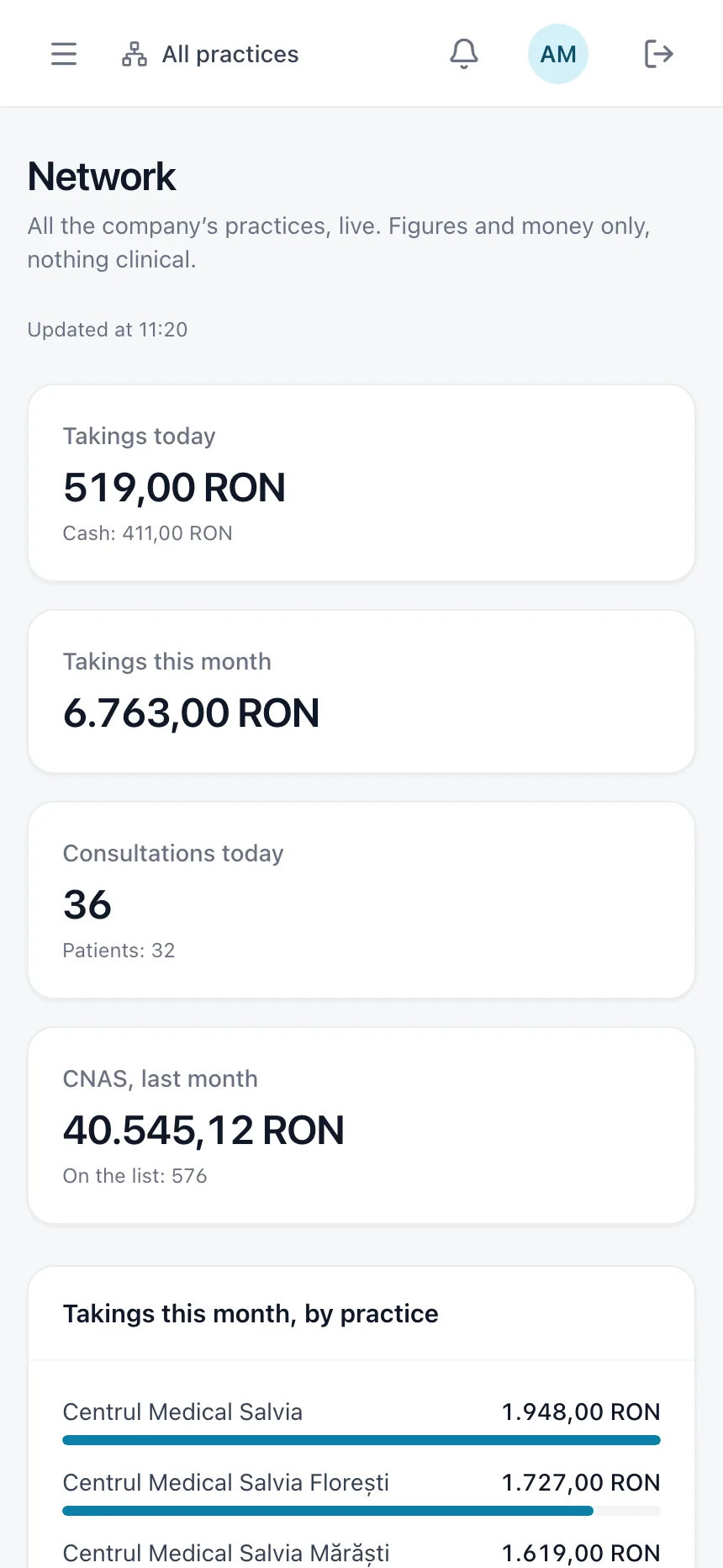
- The owner sees each practice’s figures and takings, up to date, on a phone as well, with no clinical data.
- Data export
- You can export a patient’s record, as JSON or PDF, and the data of the whole practice.
The company’s practices, on a phone
For each of the company’s practices you see the day’s consultations and takings, last month’s CNAS figure and what needs solving. The screen shows no clinical fields.
The systems a practice works with
Hover over a system, or tap it, to see what MedicCloud does for it.
In the practice

MedicCloud
Patients, consultations, appointments, the PIAS queue and the CNAS month
The authorities’ systems
The systems’ names belong to their institutions. They imply no partnership or endorsement.
Who sees the data, and what is kept
- The administrator sees no clinical data
- The server sends no clinical field to anyone who is not a doctor or a nurse, so the diagnosis and the note never reach their screen.
- A signed consultation is not changed
- A correction is added as an addendum, with its date and author, and the signed text stays as it was.
- A log of opened records
- The log shows who opened a patient’s record and when. Medical data is not deleted.
- Separate practices
- One practice cannot see another’s data, even when both belong to the same company. The owner sees the figures of all of them.
Frequently asked questions
What do I need in the practice?
A computer with a browser and an internet connection. For the certificate token and the cash register, a small program is installed on the Windows computer. You do not need a server.
What happens when PIAS isn’t answering?
You keep working. The consultation is signed, and what PIAS must validate stays in the queue, where you can see the legal deadline and what needs correcting.
Can I bring my history from my current program?
From one program, yes: patients, consultations, prescriptions, referrals and vaccinations are taken from its saved copy of the data. At the demo we will tell you whether that program is yours and what we can do for the others.
Does it work on a phone?
Yes. It opens in the phone’s browser and can be added to the home screen, like an app. The owner sees the company’s practices there.
Which practices is MedicCloud for?
For family medicine practices in Romania: individual, grouped or associated practices, SCM and SRL, with a single doctor or with several practices in the same company.
Who sees the patients’ data?
The practice’s doctor and nurse. The administrator sees appointments and payments, with no clinical fields. Each time a record is opened, it is logged.
How much does it cost?
A monthly subscription per practice. We agree the terms together, after the demo.
We can show you MedicCloud in a demo
Using a test practice’s data, we go through a working day and month-end with you.
Request a demo